Last Updated on August 6, 2025 by Sunit. S. Ekka

With the ever-increasing penetration of visual devices like computers and smartphones in our professional and personal lives, many of us might have experienced redness, irritation, aching eyes and blurry vision at some point fo our lives.
This could be due to a common eye condition known as dry eye syndrome.
There could be many reasons for such painful eye conditions, but the common cause that is increasing in recent times is prolonged exposure to a computer or smartphone screen. If your doctor has told you that your eye issue is due to over-exposure to the light emitted from this device, this article is for you.
Here we will discuss tips that can prevent the recurrence of dry eye syndrome, or it will significantly reduce the chance of developing it in the first place.
Table of Contents
Why Does Prolonged Screen Time Cause Dry Eye Syndrome? (Science Explained)
Dry eye syndrome which is also termed dry eye disease, is a condition in which the thin film of tears present over the eye surface (ocular surface) dries up, resulting in a burning, itching or aching sensation in the eye.
For the human eye to function properly, the ocular surface over the cornea should be well lubricated with the tear film. The normal thickness of the tear film is around 2 to 5 µm.
There could be many factors for the eye to get dry; in some diseases, there could be no production of tears altogether. Diabetics often suffer from dry eye syndrome because the there eye produces poor-quality tears.
However, in the recent decade, there has been an increase in the number of dry eye disease cases related to long exposure to visual devices like computers, smartphones and tablets, and it is very common among university students2.
Actually, when a person is glued to a computer screen, he or she constantly stares at the screen without blinking an eye. Blinking the eye is essential for lubricating the eye surface. Decreased blinking, coupled with an increase in evaporation of tears from the eyes, causes the eye surface to dry out. This can cause the eyes to become dry, red, and irritated.
Furthermore, the modern visual display device predominantly uses LED (Light Emitting Diode). LED screens are known to emit blue light, which is harmful to our eyes, even a recent study suggests that blue light can age you early.
Blue light has been shown to increase oxidative stress on the ocular surface, which can lead to inflammation and damage to the tear film1.
How to Treat and Prevent Dry Eyes Caused by Computer or Phone Screens
In the era of information technology, it is impossible to think of life without computers and phones. However, by taking a few precautions and steps, we can minimise the occurrence of such eye diseases.
Here we are going to learn a few tips that will surely help you with your dry and sore eyes. These tips are aimed at giving rest to your eyes from continuous tasks, improving performance by making small modifications to your desktop.
Finally, we will also discuss eye exercises to reduce strain and give a soothing relaxation to the eyes.
So, let us start with the 20-20-20 rule.
Tip 1: Use the 20-20-20 Rule to Relieve Eye Strain from Screens
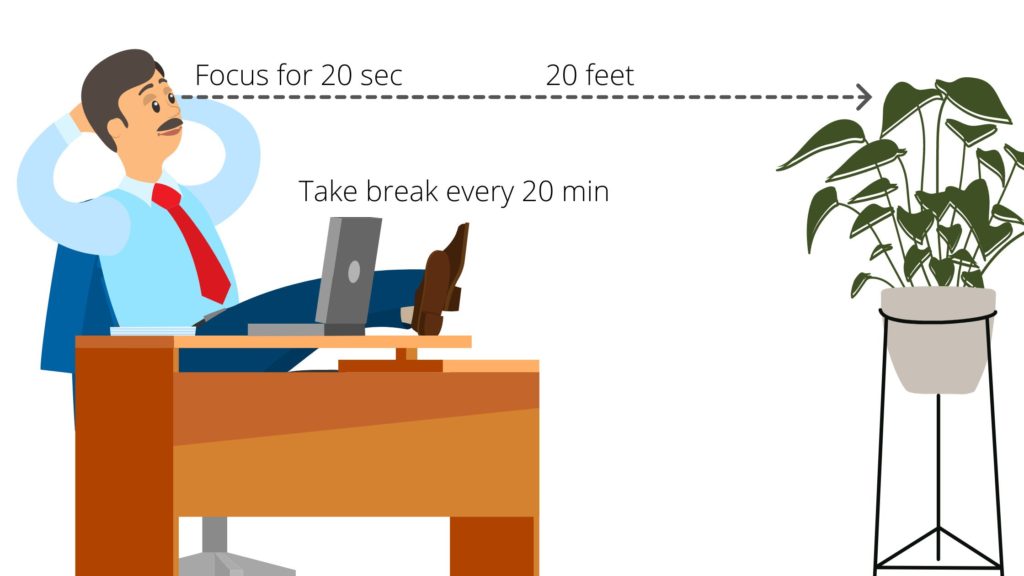
The 20-20-20 rule is a very simple technique that will help you reduce eye strain and prevent digital eye fatigue.
According to the rule, when working on a computer or smartphone:
- Take a break every 20 minutes, and
- Take your eyes off the screen,
- Focus on any object at a distance of roughly 20 feet.
- Focus for at least 20 seconds.
This will help ease your eyes and reduce eye strain, which is very important to reduce eye fatigue. This is because when we look at a computer or digital device, our eyes are constantly focusing and refocusing on the different characters on the screen.
This results in eye fatigue, dryness, and discomfort.
Taking regular breaks and focusing on something in the distance allows eyes to get a chance to relax, blink more frequently, and produce natural tears that keep them lubricated.
Pro Tips: A flip timer like the KADAMS Pomodoro Timer can help you consistently practice the 20-20-20 rule. Just set it to 20 minutes and it will beep, blink, or vibrate when it’s time to look away.

- 4 Preset Countdown Options – This visual pomodoro cube timer features four convenient countdown settings: 5, 10, 25, and…
- Visual LED Ring Display – Stay on track with a clear visual countdown! The visual timer cube features a LED ring that gr…
- Fully Customizable Countdown Timer – Take control of your time! Unlike traditional timers, this Pomodoro timer for produ…

Tip 2: Adjust Screen Brightness, Contrast, and Position to Protect Your Eyes
You must also consider the factors of the computer screen. There are a few recommended settings that will greatly ease the stress on your eyes.
- Many devices allow you to control the brightness, contrast, and colour temperature. It’s recommended to dim the screen brightness a little below eye level and increase the contrast to reduce eye strain.
- It is also recommended to increase the size of the font.
- The position of the screen also matters; you must follow desktop ergonomics. Place the screen at a comfortable distance from your eyes (about an arm’s length away) and slightly below eye level.
- You can also use an anti-glare screen or position your device away from any direct light sources to minimise glare and reflections that cause eye discomfort.
By tweaking these settings, you can make prolonged screen use less harmful to your eyes.
Pro Tips: Placing an anti-glare or blue-light-blocking screen protector on your device reduces eye strain at the source. Several well-rated options are available for all device types on Amazon.

- The Best Anti Blue-Light optical grade product. Blocks Harmful Bluelight between 380nm~480nm
- 100% Multi-Layer protection – Eliminates Hazardous UV spectrum and Blocks Harmful HEV light from your 23 inch to 24 inch…
- For screen diagonal 23 to 24 inch measure only your screen diagonal without the plastic frame. Product dimensions: W 21….
Tip 3: Blink More Often – Simple Habit to Prevent Dry Eyes
Working on computer screens, tablets or smartphones has been linked with abnormally lower blinking rates. Normal blinking is very important for a healthy eye and prevents the chances of developing dry eye syndrome or dry eye diseases.
To learn how crucial it is to blink, try not to blink for 30 seconds or a minute; your eyes will get sore and start itching with unbearable irritation.
How does frequent blinking helps:
- Actually, blinking helps spread natural tears over the surface of the eyes, keeping them moist and comfortable.
- When we blink, the upper eyelid moves over the eye surface like a wiper on the car windscreen, helping spread the tears.
- When we stare at a computer or mobile screen, we tend to blink less than normal, which can cause our eyes to dry out.
- The normal blinking rate is 12 times a minute.
In one interesting Japanese study, 104 healthy office workers were recruited to study the blink rate1. Their blink rate was recorded while working on a computer screen, while reading a book at table level, and while relaxed.
The result was indeed concerning, as blinking frequency was significantly decreased to 7 blinks per minute when working on the computer screen as compared to reading (10 blinks per minute) and relaxed conditions (22 blinks per minute).
So, one of the simplest and most effective tips for reducing the risk of dry eye syndrome is to blink frequently. Try to consciously blink more often, especially when using screens for long periods of time.
Consider setting reminders or taking breaks to rest your eyes and blink regularly throughout your day.
Tip 4: Practice Easy Eye Exercises to Reduce Strain and Refresh Your Eyes
Just like we do exercises for back and neck pain, there are exercises for eye strain as well. There are muscles present around the eyeball that are responsible for the movement of the eyes.
These eye exercises are aimed at strengthening these muscles. These are very simple exercises, like focusing on the object, focus shifting, and moving eyes clockwise and anticlockwise.
Here is the video with all the important eye exercises that you can watch and learn, or simply visit the link to our article “7 Easy Exercises For Eye Muscles To Improve Vision, Relieve Strain” which describes the exercises in a step-by-step manner in an easy-to-follow way.
How Can an Eye Doctor Help with Dry Eye Syndrome? (Professional Advice)
If you visit your ophthalmologist, they will prescribe you eye drops. These drops are actually artificial tears, also known as lubricating eye drops or tear substitutes, which can help reduce the discomfort and dryness of your eyes.
They work by adding moisture to your eyes and reducing irritation.
However, it’s always a good idea to consult an eye doctor before using any eye drops, especially if you have chronic eye problems or allergies. Use artificial tears as needed throughout the day for optimal relief from dry eye syndrome.
Keep Reading: Doctors Reversed Blindness Using Pig’s Skin Tissue
Frequently Asked Questions About Dry Eye Syndrome from Screens

The author is a physiotherapist who has been practising for the last 17 years. He holds a Bachelor's in Physiotherapy (BPT) from SVNIRTAR (Swami Vivekananda National Institute of Rehabilitation and Research), one of the prestigious physiotherapy schools in India.
Whatever he learns dealing with his patient, he shares it with the world through blogs and e-books. He also owns a YouTube channel, "Sunit Physiotherapist" with over 8 lakh active subscribers. Here, he shares everything he gets to learn serving the patient.